Storage
INFO
It is simpler to use the compose.yml file defined at root to launch the database and the storage bucket. However, it is not mandatory. As long as the backend process has access to both services with the right credentials, it will work.
You can run both the database and the storage bucket using the compose.yml file at root.
docker compose up mysql s3 -dYou might have to run the command with admin privileges (sudo on UNIX, run with admin on Windows). The -d flag launches the services in Daemon mode, meaning it won't show you the output. Stop them using the following command, or omit to show the standard output of the containers.
docker compose downDatabase
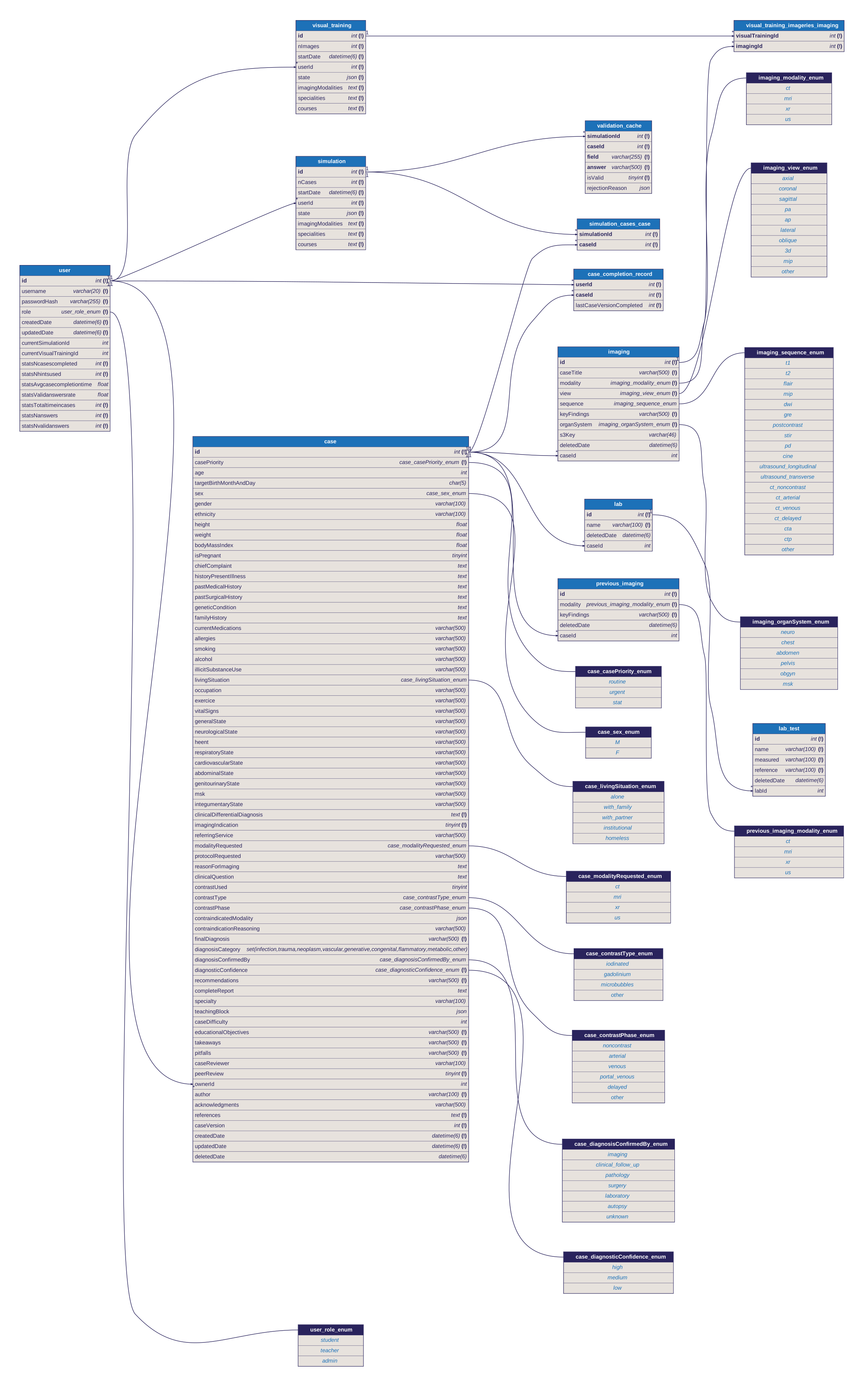
RadioWeb uses a MySQL database. The server connects to the database using the following environment variables and their corresponding default values in case they are not defined:
| Environment variable | Default value |
|---|---|
DB_HOST | "localhost" |
DB_PORT | 3306 |
DB_USER | "radioweb_user" |
DB_PASSWORD | "radioweb_password" |
DB_NAME | "radioweb_db" |
Adminer
If you want to peek at the contents of the database, you can go to http://localhost:8080 on your web browser to access a web based database managment tool.
Database diagram
S3 Bucket
The S3 Bucket is where the files (images / DICOM files) are stored. A S3 (AWS Simple Storage Service) is a type of object storage.
In the context of development, we use a Docker container running RustFS, a tool compatible with AWS S3's API. It is entirely possible to use another implementation of the S3 API, or a real S3 Bucket, as long as it shares the same environment variables defined by the developer (or the default defined in the code).
WARNING
The server is going to need the bucket to be created in your S3 instance (whether it is RustFS or any other service). By default, it is not automatically created, so create a bucket named radiobucket
| Environment variable | Default value |
|---|---|
S3_ACCESS_KEY_ID | "radioweb_access_key" |
S3_SECRET_ACCESS_KEY | "radioweb_secret_key" |
S3_BUCKET_NAME | radiobucket |
S3_REGION | "ca-central-1" |
S3_ENDPOINT | http://localhost:9000 |